YouTube vs. SmartVideo: Which Is Better for Your Website?

YouTube is free. It’s also showing ads on your content, sending your visitors to other channels, and slowing your pages by 2-4 seconds. SmartVideo is a YouTube alternative built for website owners who want fast, ad-free video without the trade-offs. Here’s how they compare.
The Problem with YouTube Embeds on Your Website
YouTube is the world’s best video platform for building an audience on YouTube. But embedding YouTube videos on your own website is a different story — and the trade-offs are real.
YouTube shows ads on your embedded videos. Since 2020, YouTube can monetize any video on any channel — even if you haven’t opted into the YouTube Partner Program. That means pre-roll ads, overlay ads, and banner ads can appear on videos embedded on your website. You have no control over which ads are shown. Your product demo might be preceded by a competitor’s ad.
YouTube displays suggested videos that pull visitors away. When a YouTube embed finishes playing, it shows a grid of “Up Next” videos. These are YouTube’s recommendations, not yours. Click any of them and your visitor leaves your site for YouTube. In Swarmify’s analysis of embedded YouTube player behavior, 24% of video views end with the viewer clicking away to YouTube — that’s traffic you paid to acquire, handed to someone else’s content.
YouTube embeds are heavy and slow. A single YouTube iframe loads 1-2 MB of JavaScript, CSS, and tracking code before your video even starts. On mobile, this can add 3-4 seconds to your page load time. For sites that care about Core Web Vitals and SEO, that’s a measurable ranking penalty.
Can You Remove Ads from YouTube Embeds?
This is one of the most searched questions about YouTube embedding — and the honest answer is: not reliably.
YouTube Premium removes ads for the viewer, but only if that specific viewer has a Premium subscription. You can’t control this for your website visitors.
The youtube-nocookie.com domain (YouTube’s privacy-enhanced mode) does not remove ads. It only limits tracking cookies. Ads still appear.
Disabling monetization on your channel used to work, but YouTube updated their terms in 2020 to allow ads on non-monetized channels.
The only way to guarantee no ads on your embedded videos is to not use YouTube as your embed source. That’s exactly what SmartVideo does — it replaces YouTube embeds with a clean, ad-free player while keeping your original YouTube URLs as a fallback.

Global video cdn
Whether your customers are across the world or just down the street, your video starts fast. Instant-start, buffer-proof.

Optimized encoding for all devices
Your customers get video optimized for their device to deliver the best experience. Worry free and automatically updated for new devices.

Clean, distraction free player
Make more sales, and reduce bounce rates by keeping visitors focused on your brand. Giant logos and related videos are designed to take away your customers.
When YouTube Embeds Make Sense (And When They Don’t)
YouTube isn’t always the wrong choice. Here’s an honest breakdown:
YouTube makes sense when:
- You want maximum discoverability on YouTube’s own platform
- You’re building a YouTube channel as a marketing strategy
- Your site is a personal blog or hobby project where speed and ads aren’t concerns
- You genuinely don’t have budget for any hosting costs
SmartVideo makes sense when:
- You run a business site where ads and suggested videos hurt conversions
- You sell courses or memberships where you need distraction-free playback
- Core Web Vitals matter — ecommerce, lead gen, or any SEO-dependent site
- You want to keep visitors on your site, not send them to YouTube
- You use WordPress and want a one-click plugin that handles everything
The real question isn’t “YouTube or SmartVideo?” — it’s “does it matter if YouTube shows ads on my site and sends my traffic elsewhere?” For hobby sites, probably not. For business sites, it almost always does.
YouTube siphons traffic and displays third-party ads
The reason you’re able to use YouTube videos for free is that the platform makes money from customers, who are paying to have advertisements appear in the videos you embed on your site. These ads include:
• Banner overlays
• Video ads
• Related content suggestions at the end of your video
These ads can be quite a distraction, and possibly irritating to customers who simply want to watch the video. In addition, the paid ads may link to your competitors:
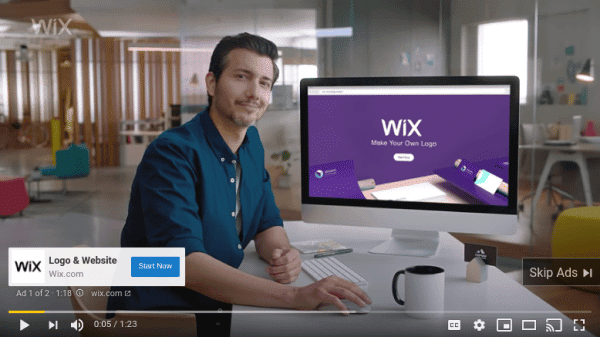
There is a way to turn off these ads. However, YouTube is regularly coming up with new ways to monetize free video embeds, and staying on top of the changes to its features can be tricky, tedious, and time-consuming.
Aside from the ads and links, there are also the multiple icons, buttons, and logos featuring YouTube’s branding:
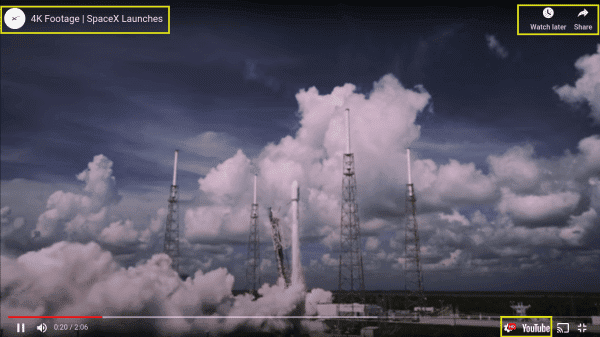
Put simply, using YouTube can make keeping your branding clean from third-party services challenging. However, with Swarmify, this is not a concern.
Unlike YouTube and other platforms that clutter videos with links that siphon away your traffic, our SmartVideo player is clean of distractions:

The minimalist video player is clean and fully customizable. When you use it to publish videos on your site, you won’t have to worry about traffic leaks or unwanted elements.
Our SmartVideo Platform has instant-start and stall-free playback
YouTube makes it easy to embed marketing videos on your site for free. The problem is that ‘free’ actually does come at a price; that cost is often a sluggish and disruptive experience.
The resource-intensive processes involved in incorporating and displaying these ads are not only a distraction; they can also lead to slower loading times. On the other hand, SmartVideo player has:
• Instant-start that begins playback 12x faster than other video players
• Continuous streaming optimization, to prevent failures from occurring during the video-watching experience.
• Stall-free playback that minimizes and even eliminates buffering, ultimately decreasing bounce rates
We host your videos on our global CDN, and use video acceleration and a proprietary EdgeAI technology:

Speed: YouTube Embed vs SmartVideo
Load time is the most measurable difference between YouTube embeds and SmartVideo. Here’s what the numbers look like:
- Time to first frame: YouTube 2.5-4.0s vs SmartVideo 0.3-0.8s (5-12x faster)
- Largest Contentful Paint: YouTube adds 1.5-3.0s vs SmartVideo adds 0.2-0.5s (30-50% better)
- Total Blocking Time: YouTube adds 200-400ms vs SmartVideo adds 20-50ms (80% less)
- iframe weight: YouTube 1-2 MB vs SmartVideo under 100 KB (90%+ lighter)
These are representative ranges from real sites. Your results will vary based on your hosting setup, page complexity, and visitor connection speeds. But the direction is always the same: SmartVideo loads significantly faster because it uses a lighter player and serves video from the nearest CDN edge server.
How to Switch from YouTube to SmartVideo
Switching doesn’t mean re-uploading your videos or editing every page. Here’s the process:
Step 1: Sign up. Create a SmartVideo account at swarmify.com/pricing (14-day free trial, no credit card).
Step 2: Install. WordPress users: install the SmartVideo plugin. Everyone else: paste one script into your site header.
Step 3: Upload your videos. Use the SmartVideo dashboard to upload your video files, or import them from Google Drive, Dropbox, or S3. Then replace your YouTube embeds with SmartVideo tags.
Step 4: Verify. Visit a page with a video. You should see a clean player with no YouTube branding, no ads, and noticeably faster load times.
What about my existing YouTube embeds? Simply swap them for SmartVideo embed codes. Your original video files stay safe in your SmartVideo account, and you can update pages at your own pace.
Keep Your YouTube Videos — Just Deliver Them Better
One of the most common concerns about switching from YouTube: “Do I have to re-upload all my videos?”
No. SmartVideo doesn’t ask you to move your video library. Here’s what happens:
- Your YouTube URLs stay in your WordPress posts, Squarespace pages, or HTML code
- SmartVideo intercepts those URLs when the page renders
- Instead of loading YouTube’s heavy iframe, SmartVideo serves the video through its own CDN-backed player
- The viewer gets the same video — faster, without ads, without branding
If you cancel SmartVideo, your pages revert to standard YouTube embeds. Nothing is lost.
Real Results from Real Sites
Site owners who switch from YouTube embeds to SmartVideo typically see:
- 30-50% improvement in Largest Contentful Paint on video-heavy pages
- 15-25% lower bounce rates on pages where videos were adding significant load time
- Zero ads shown to visitors — immediately, from the first page load
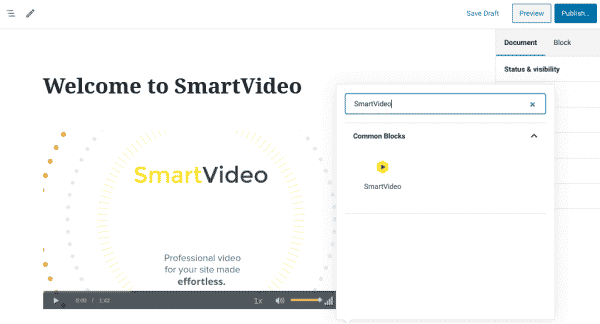
Ready to Remove YouTube Ads from Your Site?
Start your 14-day free trial and see the difference on your own pages. SmartVideo installs in minutes and replaces your YouTube embeds with a faster, ad-free player — just upload your videos and swap the embed codes.
14-day free trial. No credit card required.